
SimulIDE2.0.0-260501

Quote from erol on October 1, 2026, 10:43 amHello everyone,
I am facing an issue with serial communication on ESP32 in SimulIDE:
Transmitting data from the MCU works perfectly fine, data goes out successfully.
However, I cannot receive incoming data on the MCU side (Serial.available() always stays 0).
My connections are correct (Serial.TX -> MCU.RX(G03), Serial.RX <- MCU.TX(G01) ) and incoming data is visible on SimulIDE's serial port screen, but the data is not being propagated to the MCU pins (RX pin).
How can we fix this RX receiving failure in SimulIDE, has anyone encountered this before?
Thanks in advance for any help!
Hello everyone,
I am facing an issue with serial communication on ESP32 in SimulIDE:
Transmitting data from the MCU works perfectly fine, data goes out successfully.
However, I cannot receive incoming data on the MCU side (Serial.available() always stays 0).
My connections are correct (Serial.TX -> MCU.RX(G03), Serial.RX <- MCU.TX(G01) ) and incoming data is visible on SimulIDE's serial port screen, but the data is not being propagated to the MCU pins (RX pin).
How can we fix this RX receiving failure in SimulIDE, has anyone encountered this before?
Thanks in advance for any help!

Quote from fredcwGO_BR on October 1, 2026, 12:50 pmHowdy,
Ramdom thoughts here...
Without your .sim2 it's difficult to help., if you could share;.One thing you can do is to hook a logical analizer to both lines and verify that
data is actually in the wire , . to narrow down inside the esp. , watch out to the serial speed on the options of
the port , if they don't match, SimulIDE serial port won't be able to synchronize different bit streams.,
Take these with a lot of salt., not an expert... just random thougths.
Howdy,
Ramdom thoughts here...
Without your .sim2 it's difficult to help., if you could share;.
One thing you can do is to hook a logical analizer to both lines and verify that
data is actually in the wire , . to narrow down inside the esp. , watch out to the serial speed on the options of
the port , if they don't match, SimulIDE serial port won't be able to synchronize different bit streams.,
Take these with a lot of salt., not an expert... just random thougths.

Quote from arcachofo on October 1, 2026, 1:18 pmIn addition to tips from @fredcwgo_br I can confirm that receiving form Serial is working for me:
Try the example attached and see if it works for you.
In addition to tips from @fredcwgo_br I can confirm that receiving form Serial is working for me:
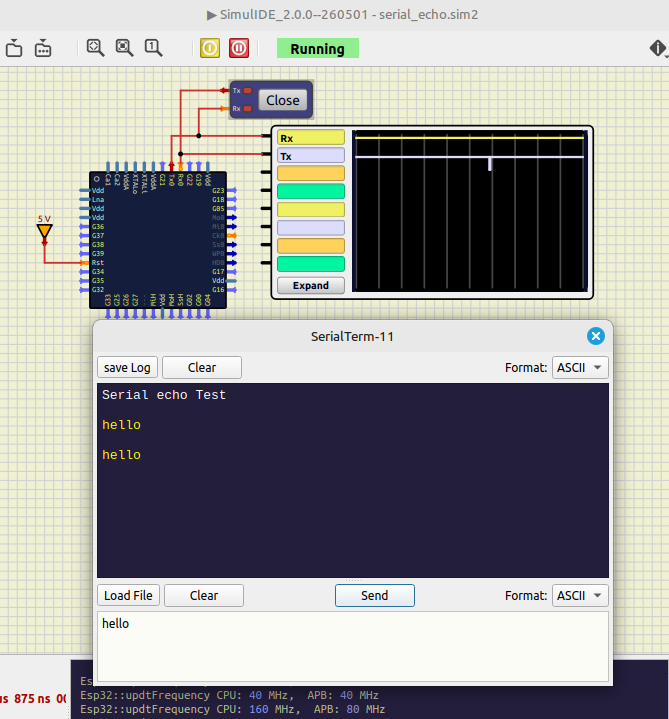
Try the example attached and see if it works for you.
Uploaded files:Quote from erol on October 1, 2026, 1:59 pmThank you, I appreciate your valuable suggestions and the example you shared; it's quite helpful for now.
Actually, I am developing a free IoT communication tool (https://micset.wixsite.com/micset) and planning to use SimulIDE as a testing tool in its new version. However, since I ran into some issues during my first trials, I couldn't quite pinpoint the source of the error.
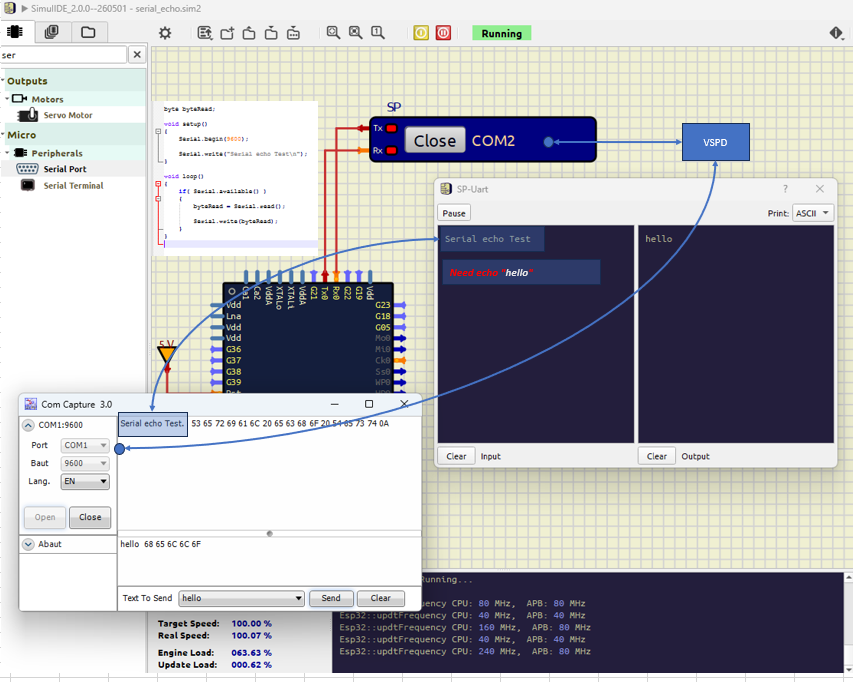
As seen in the image I attached, in the current state, the MCU can receive data but cannot send data back to the other side. For now, if I can just solve this transmission issue by having it simply echo the sent data without complicating the project too much, it will be enough for me.
Thanks again for your help!
Thank you, I appreciate your valuable suggestions and the example you shared; it's quite helpful for now.
Actually, I am developing a free IoT communication tool (https://micset.wixsite.com/micset) and planning to use SimulIDE as a testing tool in its new version. However, since I ran into some issues during my first trials, I couldn't quite pinpoint the source of the error.
As seen in the image I attached, in the current state, the MCU can receive data but cannot send data back to the other side. For now, if I can just solve this transmission issue by having it simply echo the sent data without complicating the project too much, it will be enough for me.
Thanks again for your help!
Quote from arcachofo on October 1, 2026, 2:37 pmMuch easier if you use a "Serial Terminal" component:
Does the example in my last post work for you?
If it works maybe there is some problem in your code or configuration and you could have a look at @fredcwgo_br suggestions.
Here how to add pictures to you post:
https://simulide.com/p/forum/topic/how-to-use-this-forum/
Much easier if you use a "Serial Terminal" component:
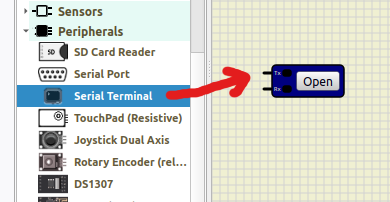
Does the example in my last post work for you?
If it works maybe there is some problem in your code or configuration and you could have a look at @fredcwgo_br suggestions.
Here how to add pictures to you post:
https://simulide.com/p/forum/topic/how-to-use-this-forum/
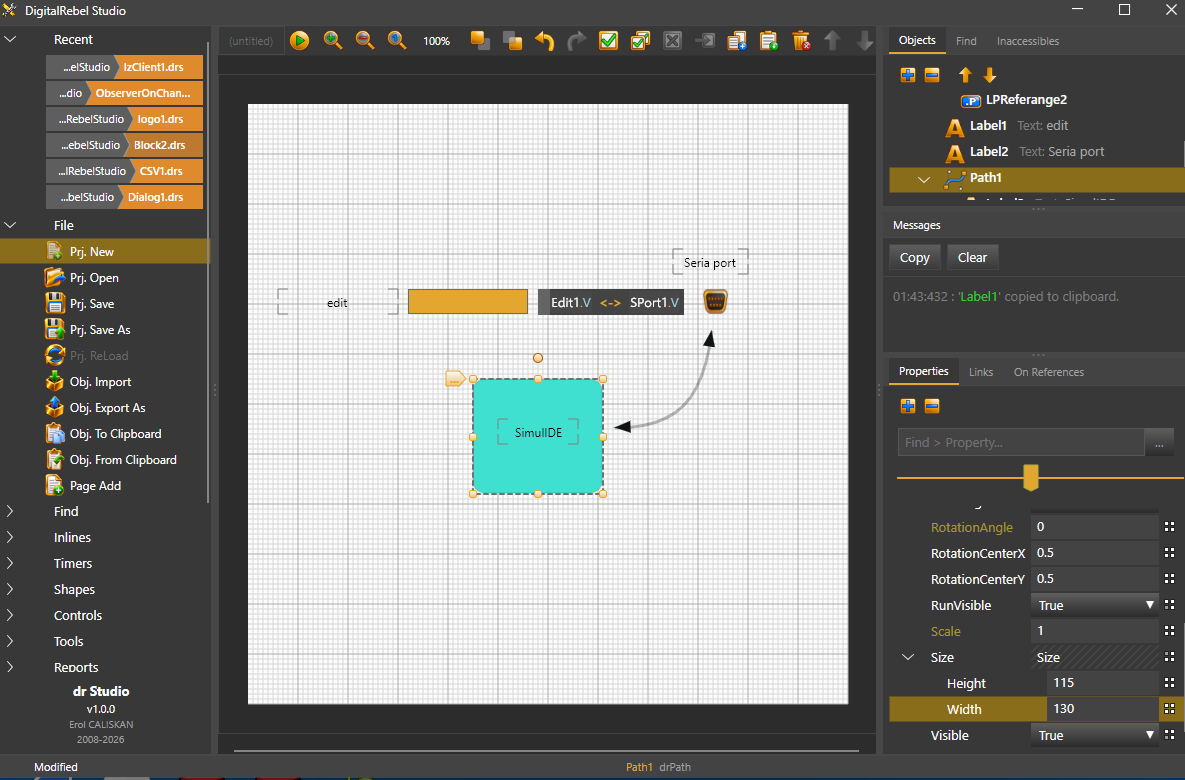
Quote from erol on October 1, 2026, 3:00 pmFor your example to be useful, it needs to be connected to a serial port; I couldn't see that COM1 <-> SimulIDE connection in your example. I'm sorry, I haven't even gotten to know the program yet.
For your example to be useful, it needs to be connected to a serial port; I couldn't see that COM1 <-> SimulIDE connection in your example. I'm sorry, I haven't even gotten to know the program yet.
Quote from fredcwGO_BR on October 1, 2026, 3:44 pmJust an idea.
I don't know about your environment, but if your use case involves diferent softwares, that do communicate with serial ports, you can patch virtual serial ports through tty0tty , with the added benefit of a sniffer to look between everything ., https://github.com/freemed/tty0tty , there are others,... this is just what i use most.
it works mainly in linux (almost all major distros) , and if it is not your case, VM (qemu, virtualbox, etc ) is always an option.
Hope this helps
Best regards
Just an idea.
I don't know about your environment, but if your use case involves diferent softwares, that do communicate with serial ports, you can patch virtual serial ports through tty0tty , with the added benefit of a sniffer to look between everything ., https://github.com/freemed/tty0tty , there are others,... this is just what i use most.
it works mainly in linux (almost all major distros) , and if it is not your case, VM (qemu, virtualbox, etc ) is always an option.
Hope this helps
Best regards